Getting Google Calendar Invitations to Pass DMARC
An Introduction to Google's Behavior with DMARC
While Google has been a long-time supporter of DMARC, there are still a few Google apps that aren't fully equipped to send DMARC-compliant emails under Sender Policy Framework (SPF) guidelines.
If you're using Google Workspace / G-Suite with your own domain, emails sent from certain Google apps (like Docs, Sheets, Slides, Gmail API, and Calendar) will still use a domain that points back to Google, not your domain. This means SPF can't align with your domain and there is a high risk for rejection of those emails.
If your organization’s DMARC policy is set to either P=Quarantine or P=Reject and DKIM isn't properly configured, your emails will fail DMARC checks, and your Google Calendar invites stand a high chance of being blocked.
If DKIM has not already been configured for your domain, please see the partner Knowledge Base article on Configuring DKIM for Google Workspace, located here.
Enabling DKIM Signing in Google Workspace (G-Suite)
Steps to enable DKIM:
- Navigate to your Google Admin console, reachable at Admin.Google.com.
- Sign in using an administrator account.
- In the Admin Console, go to Menu > Apps > Google Workspace > Gmail.
- Click Authenticate email.
- In the Selected Domain menu, select the domain you want to set up DKIM.
- Click the Generate New Record button. In the Generate New Record box, select your DKIM key settings.
- During this process, you'll be asked to select the bit strength for the DKIM key. We suggest opting for a bit strength of 2048, as longer keys offer enhanced security. However, keep in mind that not all domain DNS providers can accommodate this key size. It's a good idea to check your domain DNS provider or administrator to see if this DKIM bit size is supported. You'll also be asked to select a DKIM prefix selector. The default option is "google", and we advise to keep it as is.
- Copy the DKIM record value provided by Google and publish it with your domain's DNS provider.
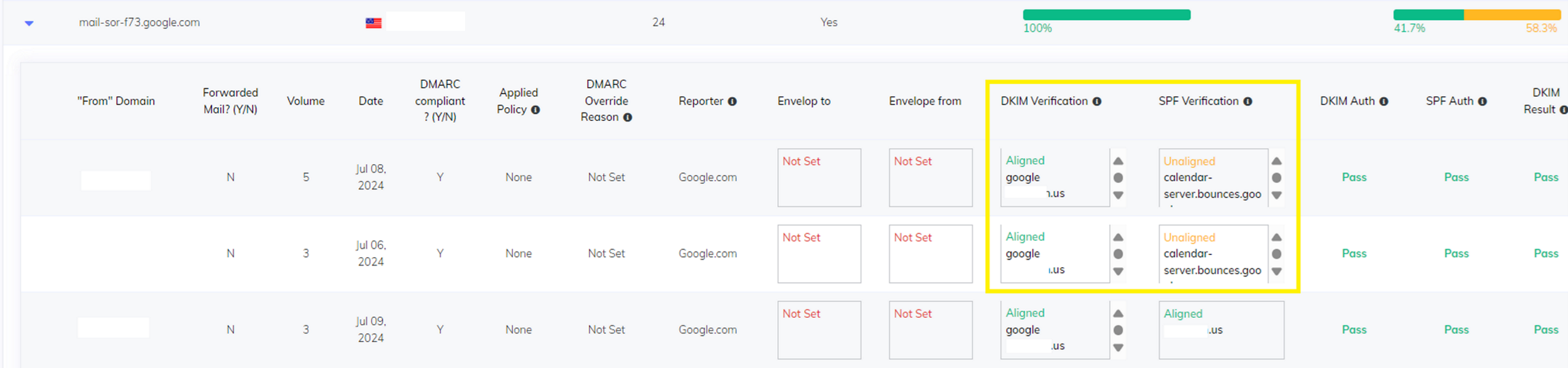
Once configured, giving the domain a couple of days to let traffic and reports come in is best. Once some data has collected, visiting the DMARC Director portal will reflect the new records and will show those emails with DKIM signatures from Google Workspace. These signatures are correctly attached and aligned, ensuring the email meets DMARC standards.
While it is always preferred to achieve full DMARC compliance using both SPF and DKIM, due to the way Google sends Calendar invites and emails from other applications, this isn't possible. At this point in time, using DKIM authentication is the only solution.